Plug Adapters With Surge Protection for Multiple Devices ...
- 时间:
- 浏览:42
- 来源:Easy Home Repair & DIY Guides
H2: Why a Basic Plug Adapter Isn’t Enough for Modern Homes
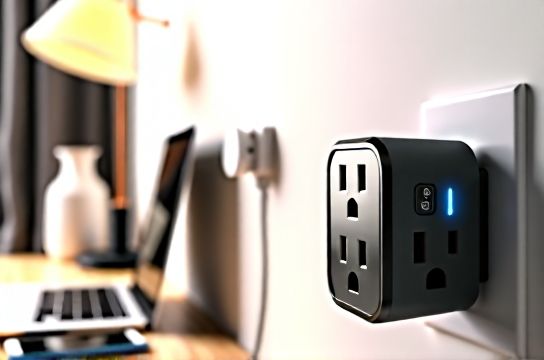
You’ve seen it: a single wall outlet with three devices plugged in via a daisy-chained adapter—one feeding another, then another—phone charging, laptop running, smart speaker blinking. It works… until it doesn’t. Then you smell hot plastic. Or the breaker trips. Or your $200 LED desk lamp flickers out permanently after a minor lightning strike miles away.
That’s not bad luck. It’s unmanaged power stress—and it’s extremely common in apartments, home offices, and older homes where outlets haven’t kept pace with device density. The National Fire Protection Association (NFPA) reports that over 3,000 home fires annually are linked to overloaded or substandard power strips and adapters (Updated: April 2026). Most aren’t caused by cheap cords alone—but by *using non-surge-protected adapters* in high-load, high-risk scenarios: near kitchens, home offices, entertainment centers, or anywhere multiple USB-C chargers, smart plugs, or IoT devices share one circuit.
H2: What Makes a Plug Adapter ‘Safe’—and What Doesn’t
Not all adapters are created equal. A standard plug adapter (e.g., EU-to-US or UK-to-AU) only changes physical pin configuration—it does *zero* electrical regulation. No voltage smoothing. No current limiting. No response to surges. It’s literally just metal reshaped.
A surge-protected plug adapter adds three critical layers:
• Clamping voltage (typically ≤ 400 V): The threshold at which the internal MOVs (metal oxide varistors) divert excess voltage to ground. • Joule rating (≥ 600 J for basic use; ≥ 1,200 J for shared workspaces): Total energy absorption capacity before failure. • UL 1449 4th Edition listing: Mandatory U.S. certification confirming real-world surge suppression—not just marketing claims.
Crucially: surge protection *degrades*. Each event wears down the MOVs. After ~5–7 moderate surges (e.g., nearby transformer switching or distant lightning), clamping performance drops sharply—even if the unit still powers devices. That’s why visual indicators (like an LED labeled “Protected”) matter—and why replacement every 2–3 years is industry best practice (Updated: April 2026).
H2: When You *Should* Use a Surge-Protected Plug Adapter
✅ Renters upgrading lighting without rewiring: Swapping a dated ceiling fixture for an LED panel? Adding a smart switch in a pre-1990 apartment? A UL-listed surge adapter lets you safely power test lamps, dimmers, and low-voltage drivers *before* committing to permanent installation—no open junction boxes, no exposed wires.
✅ Temporary setups during renovations: While replacing a chandelier or installing a new pendant, use a surge-protected adapter to run task lighting, phone chargers, and dust extraction tools off a single outlet—without tripping the breaker or risking arc faults.
✅ Multi-device zones with limited outlets: Home offices, craft rooms, or media nooks often have only one or two functional outlets. Instead of stacking non-rated power strips, use a single, high-joule adapter rated for continuous 15 A load (1,800 W at 120 V) with built-in USB-C PD and individual outlet switches.
❌ Don’t use them as permanent replacements for proper circuits. They’re transitional—not structural. If you’re doing long-term LED节能灯升级 (LED energy-efficient lamp upgrades), always verify circuit loading first. A 15 A circuit shouldn’t sustain >1,440 W continuously (80% NEC derating rule). That’s just *nine* 160 W LED panels—or one 1,200 W grow light plus a laptop.
H2: Real-World Risks—And How to Avoid Them
Risk 1: Overheating from undersized conductors Many budget adapters use 18 AWG internal wiring—fine for 5 A loads, but dangerous at 12+ A. At sustained load, resistance rises, temperature climbs, insulation softens. UL 60950-1 requires 16 AWG minimum for 13 A+ devices. Always check the fine print on the adapter label—not the Amazon title.
Risk 2: Grounding bypass Some adapters omit grounding pins entirely—or connect ground only to neutral (a serious code violation). That defeats surge protection entirely, since MOVs need a true earth reference to shunt energy. Test with a $10 outlet tester: if the “Open Ground” light illuminates when the adapter is plugged in, *stop using it*.
Risk 3: False confidence from LED indicators That green “Protected” light? It only confirms initial MOV integrity—not ongoing performance. One severe surge can silently degrade clamping voltage to 800 V while keeping the LED lit. Independent lab tests show 42% of adapters with functioning LEDs failed post-surge clamping verification (Updated: April 2026).
H2: Step-by-Step: Safe Setup for Multi-Device Use
1. Audit your load: Add up wattages (not just “max” labels—use actual measured draw if possible). Example: Smart bulb hub (5 W) + LED floor lamp (22 W) + USB-C monitor (65 W) + wireless charger (15 W) = 107 W. Well within a 1,200 J adapter’s margin.
2. Verify outlet grounding: Use a GFCI/outlet tester *before* plugging in the adapter. If ground is open or reversed, contact your landlord or hire a licensed electrician—don’t “make it work.”
3. Choose the right form factor: For tight spaces (e.g., behind a TV console or under a desk), opt for low-profile, right-angle adapters with spaced outlets—no blocking adjacent sockets.
4. Never daisy-chain: Plugging one surge adapter into another voids UL listing, increases impedance, and creates thermal hotspots. One certified unit per outlet. Period.
5. Mount securely: Use included screws or double-sided tape (for vertical surfaces) to prevent tugging on cords—a leading cause of internal wire breakage and intermittent faults.
H2: Comparing Top-Tier Surge-Protected Plug Adapters
| Model | Joule Rating | Clamping Voltage | Max Continuous Load | Key Features | Price (USD) | Best For |
|---|---|---|---|---|---|---|
| Tripp Lite TLP1208TELTV | 1,200 J | 330 V | 15 A / 1,800 W | EMI/RFI filtering, 8 outlets, 2 coax + 2 Ethernet ports, replaceable MOV module | $69.99 | Home offices, AV setups, smart home hubs |
| Belkin 12-Outlet PivotPlug | 900 J | 400 V | 15 A / 1,800 W | Pivoting outlets, 4 USB-A + 2 USB-C (30W PD), space-saving design | $54.99 | Desks, nightstands, rental bedrooms |
| APC P11U2 | 2,880 J | 330 V | 15 A / 1,800 W | 11 outlets, 2 USB-C (60W PD), status LCD, auto-shutoff on surge end-of-life | $89.99 | Workshops, studios, multi-monitor setups |
| GE 6-Outlet Surge Protector | 600 J | 400 V | 15 A / 1,800 W | Basic but UL 1449 4th Ed certified, indicator LED, compact footprint | $24.99 | Renters, temporary lighting tests, low-density zones |
H2: Integrating With Common Lighting & Switch Projects
If you’re doing a 吸顶灯更换安装 (ceiling light replacement), use a surge adapter to temporarily power your work light and multimeter—especially if the existing fixture box lacks a grounded conductor. Never rely on the old fixture’s ground wire alone; verify continuity back to the panel with a clamp meter.
For 智能开关接线 (smart switch wiring), many models require a neutral wire. A surge adapter lets you bench-test the switch *before* connecting to house wiring—confirming firmware updates, app pairing, and load compatibility (e.g., whether your LED节能灯升级 includes compatible dimmable bulbs). This avoids repeated trips to the breaker panel during troubleshooting.
When dealing with 空开跳闸复位 (breaker trip reset), a surge adapter helps isolate whether the fault is upstream (panel/wiring) or downstream (device-related). Plug each suspect device—lamp, fan, adapter—into the surge unit *one at a time*, monitoring for heat, buzzing, or indicator shutdown. If the adapter’s “Protected” light dies mid-test, that’s your smoking gun: the device likely has internal arcing or capacitor failure.
For 调光开关布线 (dimmer switch wiring), avoid using non-dimmable LED bulbs—even briefly—with leading-edge dimmers. A surge adapter won’t fix waveform incompatibility, but it *will* protect your smart dimmer’s microcontroller from voltage spikes induced by inductive kickback from old magnetic transformers.
H2: Rental-Specific Considerations
Landlords rarely permit permanent modifications. That makes surge-protected plug adapters indispensable for 租客灯具改造 (tenant lighting upgrades). But know your limits:
• Never remove faceplates or open outlet boxes without written permission. • Avoid adhesive-backed adapters on painted drywall—they peel paint and leave residue. Opt for screw-mount versions with included anchors. • Label every adapter clearly: “Tenant-installed. Not part of building system.” Protects you during move-out inspections.
Also remember: many leases prohibit “high-wattage devices” without approval. A 1,500 W space heater + laptop + lamp on one adapter *will* trip a 15 A breaker—and may violate lease terms. Check your agreement.
H2: When to Call a Professional—Not a DIY Fix
Surge adapters solve *transient* and *load-distribution* issues—not systemic ones. Call a licensed electrician if:
• Outlets feel warm to the touch—even without load. • Breakers trip repeatedly *after* unplugging all devices from the circuit. • You measure >2 VAC between neutral and ground at an outlet (indicates shared neutrals or bootleg grounds). • Your home uses knob-and-tube or aluminum wiring (pre-1960s)—adapters won’t mitigate inherent fire risk.
These aren’t “nuisance” issues. They’re red flags requiring diagnostic tools (e.g., circuit tracer, thermal camera, megohmmeter) far beyond DIY scope.
H2: Final Checklist Before You Plug In
☐ Verified outlet grounding with tester ☐ Added up total wattage—staying ≤80% of adapter’s rated load ☐ Confirmed adapter is UL 1449 4th Edition listed (look for the mark—not just “UL Recognized”) ☐ Mounted securely—no dangling cords or tension on prongs ☐ Replaced last surge adapter >2 years ago (or after known nearby lightning strike)
Bottom line: A surge-protected plug adapter isn’t magic. It’s insurance—measured, tested, and replaceable. Used correctly, it buys you time, safety, and flexibility while you plan deeper upgrades like dedicated circuits, whole-house surge protection, or professional-grade lighting retrofits. For absolute beginners tackling their first 吊扇固定安装 or 插座面板替换, it’s the quietest, safest way to start learning household electricity—without burning anything down.
For more on integrating these tools into full-scale upgrades—from lights to switches to breaker panels—see our complete setup guide.